





The complete 2026 guide with verified RPC parameters, both setup methods, illustrated steps, and everything you need to know about Nova before connecting your wallet.
Quick Answer: Here is how to add Arbitrum Nova to MetaMask
- Open MetaMask and click the network dropdown at the top of your wallet
- Click Add Network at the bottom of the list
- Choose Add a network manually and fill in the details below
- Click Save and then Switch to Arbitrum Nova and you are ready to go
| Network Name | Arbitrum Nova |
| Chain ID | 42170 |
| RPC URL | https://nova.arbitrum.io/rpc |
| Currency Symbol | ETH |
| Block Explorer | https://nova.arbiscan.io |
Effective January 31, 2026, certain third-party developer tools are no longer supported for Arbitrum Nova environments. This does not affect the network itself, user funds, or the public RPC endpoints. Everything in this guide continues to work normally. Developers should check docs.arbitrum.io for the current list of supported Nova tooling providers.
ֿWhat is Arbitrum Nova?
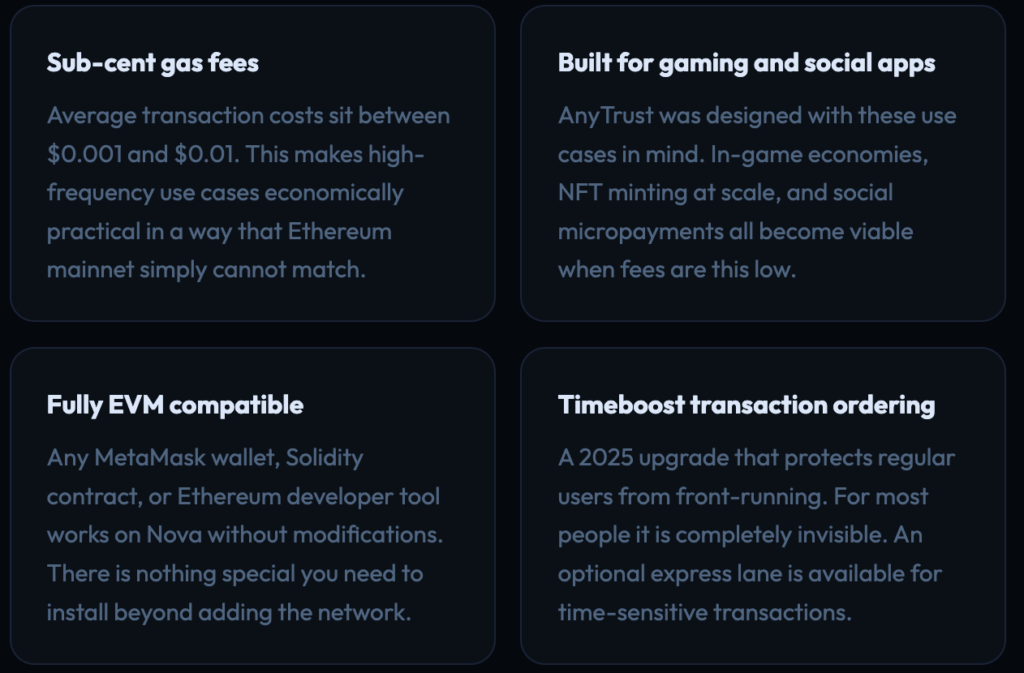
Arbitrum Nova is a Layer 2 network built on top of Ethereum by Offchain Labs, the same team behind Arbitrum One. Both chains reduce Ethereum gas fees significantly, but Nova uses a different technology called AnyTrust. This was designed for applications that need to handle very high transaction volumes at near-zero cost. Think blockchain games, social apps, NFT platforms, and tipping systems where users make dozens of small transactions per session.
The key difference from Arbitrum One is how transaction data gets stored. Arbitrum One posts everything directly to Ethereum, which is the most secure approach. Nova instead uses a Data Availability Committee, a group of trusted organizations that store transaction data off-chain and provide cryptographic proof to Ethereum. This makes Nova cheaper per transaction, though it introduces a mild level of trust in those committee members. As long as at least two of them remain honest, user funds stay safe.
In 2025, Nova received the Timeboost upgrade. This is a transaction ordering system that gives users an express processing lane while keeping the main mempool private. It protects against front-running attacks and generates revenue for the Arbitrum DAO.
Arbitrum Nova vs Arbitrum One
Both are live Arbitrum mainnets that use real ETH. They are not competing products so much as tools designed for different jobs. Here is how they compare side by side:
| Feature | Arbitrum Nova | Arbitrum One |
|---|---|---|
| Technology | AnyTrust with Data Availability Committee | Optimistic Rollup |
| Average gas fee | $0.001 to $0.01 | $0.01 to $0.10 |
| Block time | About 0.25 to 0.5 seconds | About 0.25 seconds |
| Chain ID | 42170 | 42161 |
| Best suited for | Gaming, social apps, micropayments, high-volume NFTs | DeFi protocols, high-value swaps, lending |
| Trust model | Requires honest DAC members | Fully trustless and Ethereum-backed |
| Status | Active | Active |
Not sure which one to use? If you are using DeFi protocols like Uniswap or GMX, Arbitrum One is the right choice. If you are playing blockchain games, minting lots of NFTs, or using social dApps with frequent small transactions, Arbitrum Nova is what you want.
Verified Network Parameters
These are the official Arbitrum Nova parameters taken directly from Arbitrum’s official documentation. Use these when setting up MetaMask manually.
| Parameter | Value |
|---|---|
| Network Name | Arbitrum Nova |
| Chain ID | 42170 |
| Currency Symbol | ETH |
| RPC URL | https://nova.arbitrum.io/rpc |
| Block Explorer | https://nova.arbiscan.io |
| Alternative Explorer | https://arbitrum-nova.blockscout.com |
Before entering any RPC URL manually, cross-check it against chainlist.org/chain/42170 or the official Arbitrum docs. Phishing sites register domain names that look nearly identical to legitimate ones, with altered RPC endpoints that are designed to intercept your transactions.
Method 1: Add Arbitrum Nova via ChainList
ChainList is an open-source EVM network directory maintained by DefiLlama. It fills in all the network parameters automatically so you never have to type anything manually. This is the fastest method and removes the risk of typos in your RPC URL or Chain ID.
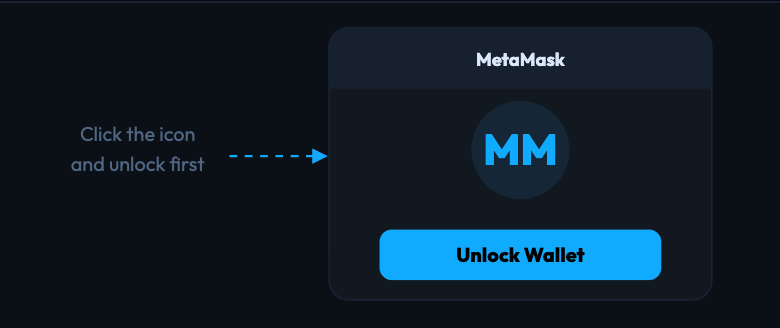
Step 1 – Unlock MetaMask in your browser
Click the MetaMask icon in your browser toolbar and enter your password. You need MetaMask unlocked before ChainList can connect to it.
Step 2 – Go to chainlist.org and connect your wallet
Navigate to chainlist.org. It is worth bookmarking so you always land on the real site. Click Connect Wallet in the top right corner and approve the connection in MetaMask.
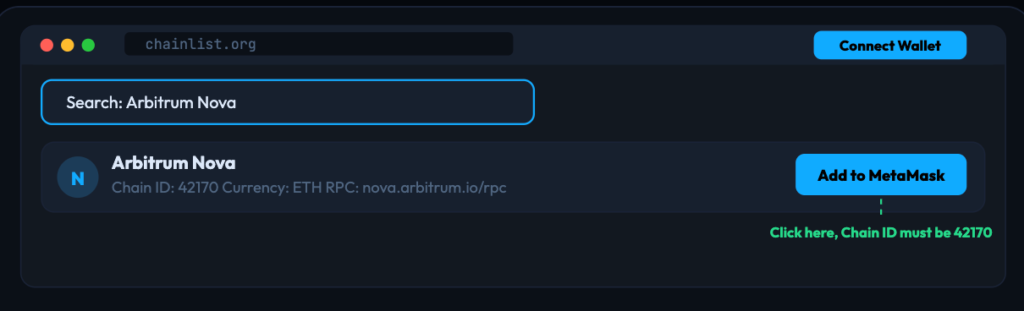
Step 3 – Search for Arbitrum Nova and add it
Type Arbitrum Nova in the search bar. Find the result that shows Chain ID 42170 and click Add to MetaMask next to it.
Step 4 – Approve the network in MetaMask
A MetaMask popup will appear showing the network details. Check that the Chain ID reads 42170. If everything looks right, click Approve and then Switch Network.
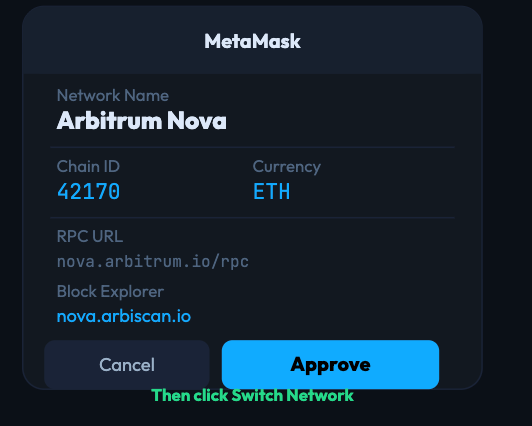
Arbitrum Nova will now appear in your MetaMask network selector. You can switch to it anytime from the dropdown at the top of your wallet.
Method 2: Add Arbitrum Nova Manually
Use this if ChainList is unavailable, or if you want to choose a specific RPC provider for better performance or privacy.
Step 1 – Open the network selector
Click your current network name at the top of your MetaMask wallet. For example, where it shows Ethereum Mainnet. A dropdown opens with all your saved networks.
Step 2 – Go to Add a network manually
At the bottom of the network dropdown, click Add Network. On the next screen, scroll down and click Add a network manually.
Step 3 – Enter the Arbitrum Nova details
Copy each value from the table in the network parameters section above. Pay close attention to the Chain ID. It must be 42170. Do not confuse it with 42161, which belongs to Arbitrum One.
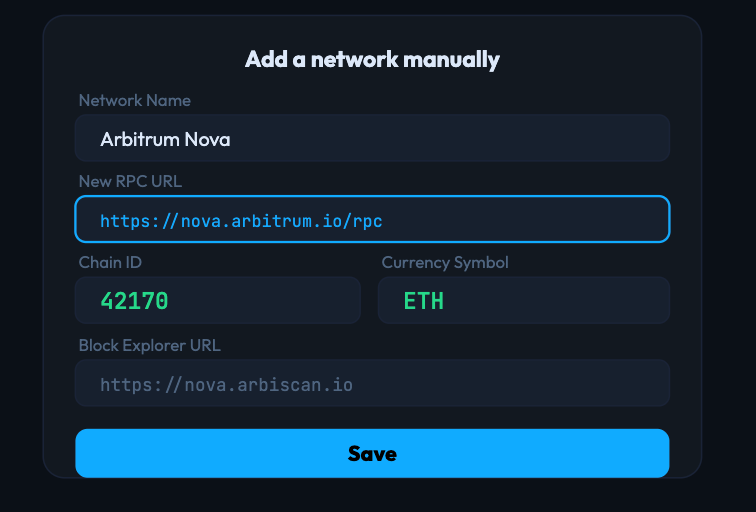
Step 4 – Save and switch
Click Save. MetaMask will confirm the network was added and ask if you want to switch to it now. Click Switch to Arbitrum Nova and you are all set.
Adding Arbitrum Nova on MetaMask Mobile
The MetaMask mobile app on iOS and Android handles custom networks the same way the desktop version does. Here are the two ways to do it.
Option A: Through the app settings
Tap the hamburger menu in the top left corner, then go to Settings, then Networks, then Add Network, and then Add a Network Manually. Enter the same parameters from the table above and tap Add.
Option B: Through the built-in browser
Open the browser tab inside the MetaMask mobile app, navigate to chainlist.org/chain/42170, and tap Add to MetaMask. It connects directly to your mobile wallet with no manual entry needed.
Troubleshooting Common Issues
MetaMask shows “Could not fetch Chain ID” when adding manually
This usually means there is a typo in the RPC URL or the server is temporarily under load. Check that you entered https://nova.arbitrum.io/rpc exactly with no extra spaces. If it still fails, try the ChainList method instead since it automatically picks a healthy RPC server. Alternative providers like QuickNode and dRPC also officially support Arbitrum Nova.
MetaMask says “This Chain ID is already added”
Arbitrum Nova is already in your wallet. Open the network dropdown at the top of MetaMask, find Arbitrum Nova in the list, and switch to it. If the existing entry has a broken RPC URL, you can update it by going to Settings, then Networks, and editing the Arbitrum Nova entry directly.
I entered Chain ID 42161 instead of 42170 by mistake
Chain ID 42161 belongs to Arbitrum One, which is a completely different network. Go to Settings, then Networks, find the incorrect entry and delete it. Then add Arbitrum Nova again using the correct Chain ID of 42170.
The network added successfully but my ETH balance shows zero
Your wallet address is correct but you do not have any ETH on the Arbitrum Nova chain yet. Balances are chain-specific. To get ETH onto Nova, use the official Arbitrum Bridge at bridge.arbitrum.io to transfer funds from Ethereum or Arbitrum One.
Transactions are slow or keep failing
The public RPC at nova.arbitrum.io/rpc can get congested during busy periods. Switch to a dedicated provider like QuickNode or dRPC for more reliable connections. To update your RPC URL, go to Settings, then Networks, then Arbitrum Nova, and change the RPC field. You do not need to delete and re-add the network to do this.
A dApp says I am on the wrong network even though Arbitrum Nova is in my wallet
Having a network saved in MetaMask and actively being connected to it are two different things. Click the network name at the top of MetaMask and select Arbitrum Nova from the dropdown. Most dApps will detect the switch automatically. If they do not, disconnect and reconnect your wallet on the dApp side.
Security Tips
- Never enter your seed phrase during network setup. MetaMask will never ask for it when you are adding a custom network. If any website asks for your seed phrase at any point during this process, close that tab immediately. That is a phishing attack.
- Always check the Chain ID before approving. The most common trick used in fake MetaMask popups is a wrong Chain ID. Arbitrum Nova is always 42170. If you see a different number in the approval screen, do not proceed.
- Use the official bridge when moving funds. To move ETH onto Arbitrum Nova, always use bridge.arbitrum.io. Third-party bridges do exist and some are legitimate, but verify them carefully before connecting your wallet. Fake bridge sites are one of the most common ways people lose funds in crypto.
- Verify token contracts before trading. Before swapping or approving any unfamiliar token on Nova, look up its contract address on nova.arbiscan.io. Fake tokens that impersonate legitimate projects are common across all Layer 2 networks.
A note on the AnyTrust trust model: unlike Arbitrum One, Nova relies on a Data Availability Committee for its security guarantees. This is not a concern for most regular users, but it is worth understanding. If you are moving very large amounts of ETH, Arbitrum One’s fully trustless model may be the safer choice. For other EVM-compatible network additions, see our guides on adding Solana to MetaMask or the full MetaMask network guide series.
Frequently Asked Questions
What is the difference between Arbitrum Nova and Arbitrum One?
Both are Ethereum Layer 2 chains made by Offchain Labs. Arbitrum One uses Optimistic Rollup technology and works best for high-value DeFi activity. Arbitrum Nova uses AnyTrust with a Data Availability Committee, making transactions significantly cheaper. Nova was built specifically for gaming, social applications, and any use case that involves very frequent small transactions.
Can I use my existing MetaMask address on Arbitrum Nova?
Yes. Your MetaMask address is the same across every EVM-compatible chain, including Ethereum, Arbitrum One, and Arbitrum Nova. Your balances are tracked separately on each chain though. ETH you hold on Ethereum will not show up on Nova until you bridge it over.
How do I get ETH onto Arbitrum Nova?
Use the official Arbitrum Bridge at bridge.arbitrum.io. You can send ETH from Ethereum mainnet or from Arbitrum One. The bridge handles the transfer and funds typically appear on Nova within a few minutes.
What applications are available on Arbitrum Nova?
Nova’s ecosystem is centered on gaming and social apps. Because the network charges sub-cent fees, it attracts applications where users interact on-chain very frequently. The Arbitrum portal at portal.arbitrum.io has an up-to-date list of projects currently building on Nova.
Is there a testnet for Arbitrum Nova?
Arbitrum Nova does not have a dedicated testnet. Developers building apps for Nova typically test on Arbitrum Sepolia, which uses Chain ID 421614 and is the closest available testnet environment. Once testing is complete they deploy directly to Nova mainnet.
What happened with third-party tooling in January 2026?
As of January 31, 2026, certain third-party developer tools stopped being supported specifically for Arbitrum Nova environments. This only affects developer tool integrations and has no impact on the network, user funds, or the public RPC endpoints. The official Arbitrum documentation has the full list of what changed and what the alternatives are.
What is Timeboost and does it affect how I use MetaMask on Nova?
Timeboost is a transaction ordering upgrade that launched on Nova in 2025. It keeps the main mempool private to protect users from front-running and adds an optional express lane for time-sensitive transactions. For the vast majority of MetaMask users it is completely invisible. You will not notice anything different in how you send transactions unless you specifically choose to use the express lane.

team of 15 content editors collaborates with crypto journalists globally to provide the best and most up-to-date crypto news.




