






If you’ve been active in crypto last year, I know exactly how overwhelmed you might feel looking at a spreadsheet of trades. That’s because you may have accrued tax events from activities like airdrops, NFTs, DeFi, and high-volume trading. Most investors like you are turning to crypto tax software options to simplify their tax filings. But which one is right for you?
- What is Crypto Tax Software?
- Koinly vs CoinTracker: Core Features Comparison
- Supported Countries
- Integration Comparison
- DeFi, NFTs, Margin Trading, and Derivatives
- Cost Basis & Tax Methods
- Error Handling & Reconciliation
- Transaction Limits & Scaling
- Audit & CPA Tools
- Pricing: Which Tool Has the Best Value?
- Which Offers The Best Blend of Usability and Features
- TrustPilot Reputation
- Koinly Trustpilot Reputation
- How Does Crypto Tax Software Actually Calculate Your Gains?
- Which One Should I Choose?
- FAQs
I would recommend either CoinTracker or Koinly for your crypto taxes. Each comes with report generation, tracking, the ability to query your entries, and support for tax filing in specific countries. However, each crypto tax software is different in its approach and how these features work.
In 2026, both platforms are solid, but they’re built for different types of users. If you’re deep into DeFi or NFTs, Koinly is the stronger pick, as it integrates with over 1,000 wallets and exchanges, automatically tags your transactions, and starts at $49 a year. CoinTracker leans more toward US-based users who want to track their portfolio in real time, file directly through TurboTax, and keep their data locked down tight. It does all of that well, but you’ll usually pay more for it.
- If you trade across multiple wallets, actively use DeFi or NFTs, or file outside the US, Koinly is usually the more flexible and cost-efficient option.
- If you’re primarily US-based, want a smoother mobile experience, and prefer multi-year coverage under one plan, CoinTracker may feel simpler. The right choice depends on your tax jurisdiction, what crypto activities you engage in, and how you want pricing structured.
Who it’s NOT for:
- Koinly is not for the casual investor who only uses Coinbase and wants a “one-click” filing experience directly inside a US tax app without ever leaving the interface.
- CoinTracker is not for the hardcore yield farmer or international trader who needs granular control over cost-basis settings, as found in specific local tax laws outside the US and UK.
- Supports 1,000+ wallets, exchanges, and blockchains
- Built-in tagging for DeFi, NFTs, staking, and rewards
- Localized tax reports for US, UK, EU, Australia, and more
- Free tax-loss harvesting and tax preview tools
- Strong per-wallet cost basis tracking
- Learning curve if your portfolio is complex
- Data cleanup may be needed for some DeFi transactions
- Pricing adds up if filing multiple years
- Seamless TurboTax integration for US tax filing
- Clean, beginner-friendly interface and strong mobile app
- Real-time portfolio tracking year-round
- Covers multiple tax years under one plan
- Reliable syncing for major chains (ETH, Solana, etc.)
- Higher pricing as transaction volume grows
- Limited customization for non-US tax rules
- Fewer wallet and blockchain integrations vs Koinly
What is Crypto Tax Software?
Crypto tax software is an online finance platform that allows you to calculate your crypto tax. Think of it like your personal assistant who helps calculate your capital gains, losses, and income that you derived from your crypto transactions. The crypto tax software can also help you:
- Aggregate your crypto transactions information into one sheet
- Identify the fair market value of crypto at the time of each trade
- Apply accounting methods like FIFO or HIFO to produce a final report that you can hand to an accountant or file your taxes.
Koinly vs CoinTracker: Core Features Comparison
| Feature | Koinly | CoinTracker |
| Supported Countries | US, UK, EU, Canada, Australia, 20+ additional jurisdictions | The US is the primary focus, also supports the UK, Canada, and Australia |
| Total Integrations | 450+ exchanges, 220+ blockchains | 450+ exchanges, 60+ blockchains |
| Cost Basis Methods | FIFO, LIFO, HIFO | FIFO, LIFO, HIFO |
| Free Plan | Portfolio tracking only | Portfolio tracking only |
| Payment Options | Credit, debit, crypto | Credit, debit, crypto |
| Starting Price (Paid Plans) | $49 per tax year for 100 transactions | $59 for 100 transactions for all tax years |
| DeFi | Yes | Yes |
| Margin Trading | Yes | Yes |
| Derivatives | Yes | Yes |
| Loans | Yes | Yes |
| IRS forms & TurboTax | Yes | Yes |
| International tax reports | Yes | CSV reports only |
| Audit Trail Report | Available | Available |
| Free tax-loss harvesting tool | Yes | No |
| Customer Support | Email, priority support on higher tiers | Email, priority support on higher tiers |
| Review Score (TrustPilot) | 4.6/5 | 4.6/5 |
As you can see in the table above, Koinly casts the net wide, offering a broader technical reach, with over 220 blockchains and helping you produce tax reports for almost any country. Many Koinly users are also those seeking to reduce their tax bill or wishing to use its tax loss harvesting tool at no additional cost.
CoinTracker supports fewer blockchains with a focus on the US, UK, and Australia. If you are in other countries, you will need to rely on CSV reports, which, while practical in my view, can feel a bit limiting, since they may not be customized to your specific tax jurisdiction.
Overall, you can use both software options to track loans, DeFi, margin trading, and derivatives. Users also rate the two platforms quite highly on TrustPilot.
Supported Countries
| Report Type | Koinly | CoinTracker |
| USA IRS Reports (including TurboTax export) | Yes | Yes |
| Canada CRA report | Yes | Yes |
| UK HMRC report | Yes | No |
| Australia ATO report | Yes | No |
| European country reports | Yes | No |
You already know that each country is unique in the way it expects you to file your crypto taxes. That’s why you need to pay attention to each crypto tax software’s capabilities based on where you operate from.
If you are a North American crypto trader, you will find the two platforms pretty useful, specifically through the USA IRS reports with TurboTax integration and the Canada CRA reports. But moving out of these jurisdictions can get a little messy.
With Koinly, you have dedicated reporting for the UK (HMRC), Australia (ATO), and various European countries. You don’t have these automated reports for such jurisdictions with CoinTracker. Due to this shortcoming, I recommend Koinly if you are an international investor or living in the EU or Commonwealth nations that need localized tax documents.
Integration Comparison
| Koinly | CoinTracker | |
| Exchange integrations | 450+ | 450+ |
| Wallet integrations | 220+ | 60+ |
| Overall integrations | 1,000+ | 600+ |
| DeFi protocol | Built-in tagging for staking, liquidity pools, lending, margin, and rewards. Supports DeFi across 200+ chains. | Detects common DeFi activity on major chains such as Ethereum, Solana, Arbitrum, and Base. |
| NFT marketplace | Detects NFT mints, buys, sells, and transfers. Links gas to NFT transactions automatically. | Detects NFT buys, sells, and transfers on supported chains. |
| API reliability | Documents exchange-specific API limitations per integration page. | Provides sync and recalculation tools for delayed or incomplete data imports. |
Both platforms excel here, with a solid baseline of 450+ exchange integrations. Koinly takes this a little higher, with nearly four times the wallet support and DeFi support across 200+ chains. This makes it the preferred choice by investors engaging in high-volume crypto activity like staking, liquidity pools, and NFT minting, as it automatically links gas fees to transactions.
CoinTracker wins on major chains like Ethereum, Solana, and Base. So, it provides reliable sync tools for mainstream users. However, user feedback indicates that regardless of the platform chosen, some DeFi positions and NFT marketplace cases occasionally suffer from API sync gaps. If your portfolio extends beyond the popular assets and chains, consider Koinly’s broader integration ecosystem for an automated, hands-off experience.
DeFi, NFTs, Margin Trading, and Derivatives
| Koinly | CoinTracker | |
| DeFi | Auto-detected | Auto-detected |
| Margin trading | Yes | Yes |
| Futures & Perpetuals | Yes | Yes |
| Options | Yes | Yes |
| NFT trading & minting | Yes | Yes |
| NFT royalties tracking | Yes | Yes |
| Derivatives P&L calculation | Yes | Yes |
| Wrapped & bridged assets | Yes | Yes |
I noted very little to distinguish the two crypto tax software programs on this feature. Both platforms have DeFi auto-detection, a feature investors appreciate for doing the heavy lifting, especially for complex on-chain activities like staking or lending. You can also rely on either of the two platforms to handle high-stakes trading types, including margin trading, futures, perpetuals, and options. And in the end, you get a clean record of your transactions, thanks to a robust P&L calculations feature.
In addition, you can use both services to track NFT trading, minting, and royalties. The tools also track wrapped and bridged assets (wrapped assets are “digital coupons” that let you use a coin on a blockchain it doesn’t belong to, while bridged assets are tokens that have been sent from one network to another through a connecting bridge). This is good for interoperability, as you can economically move tokens across different blockchains without common cost basis errors or unintended taxable events.
Cost Basis & Tax Methods
| Koinly | CoinTracker | |
| FIFO | Yes | Yes |
| LIFO | Yes | Yes |
| HIFO | Yes | Yes |
| Specific ID | Yes | Yes |
| Per-wallet cost basis tracking | Yes | Limited |
I observed subtle differences here. The platforms are similar in the sense that they support principal accounting methods required by global tax authorities, including FIFO (First-In, First-Out), LIFO (Last-In, First-Out), and HIFO (Highest-In, First-Out). They also support specific IDs, where traders select specific coins to sell to optimize their tax liability.
However, I would prefer Koinly if I am looking for full support in per-wallet cost basis tracking. Earlier, I mentioned its ability to offer granular control, which I find beneficial in crypto tracking and tax calculation. With granular control, users can isolate their cost basis calculations to individual wallets. The benefit? You can avoid “mixing” the cheap, old coins with new, expensive ones on different platforms. CoinTracker has “Limited” support for this feature. Instead, you get a universal, aggregate cost basis across all connected accounts.
Error Handling & Reconciliation
| Koinly | CoinTracker | |
| Missing cost basis detection | Yes | Yes |
| Negative balance alerts | Yes | Yes |
| Duplicate transaction detection | Yes | Yes |
| Manual transaction merge tools | Yes | Yes |
| Bulk editing tools | Yes | Limited |
No worries if you handle messy data, as both platforms have robust safety net features. Whether you are looking for a seamless tool for detecting missing cost basis data, getting alerted on negative balances, or identifying duplicate transactions. You can use either tool to identify where a data import might have failed, so you don’t overpay taxes due to a $0 cost basis or double-count a trade.
Both platforms also offer manual transaction merge tools to link transfers between your own wallets that the API might have missed. However, when it comes to bulk editing tools, only Koinly offers full support. This feature may save time if you need to re-tag hundreds of DeFi transactions or fix a recurring price error across an entire wallet.
CoinTracker’s limited support for bulk editing is truly a drawback. If you trade with thousands of transactions, you spend more time on manual, one-by-one fixes. So, you may consider Koinly for a much smoother reconciliation process.
Transaction Limits & Scaling
| Koinly | CoinTracker | |
| Max transactions supported | High | High |
| Suitable for 10k+ transactions | Yes | Yes |
| DeFi counted as multiple transactions | Yes | Yes |
| Pricing increases aggressively with volume | Moderate | Higher |
Both Koinly and CoinTracker can handle high-frequency trading—even exceeding 10,000 transactions per day. You can reliably use them to generate reports for thousands of entries per year if you are an active day or auto trader.
However, I have found that for DeFi users, transaction counts often balloon much faster than anticipated. This happens because a single liquidity swap is recorded as multiple distinct events, like the swap itself, the liquidity provision, and the associated fee.
Here is where the cost variability comes into play. Koinly’s pricing increases at a moderate rate as the number of events grows, whereas CoinTracker scales at a higher price point. So, I would recommend Koinly for traders with hundreds of entries a day. It has a more sustainable path to scaling without the aggressive price hikes.
Audit & CPA Tools
| Koinly | CoinTracker | |
| CPA access sharing | Yes | Yes |
| Audit trail export | Yes | Yes |
| Detailed gain breakdown | Yes | Yes |
| Historical recalculation support | Yes | Yes |
If you work with tax and audit professionals, Koinly and CoinTracker will provide the needed audit trails and documentation. With CPA access sharing, you can securely invite your accountant to view and manage your crypto returns directly within the software. Here, you avoid the need to manually send dozens of CSV files back and forth.
You do all this while keeping a complete audit trail, exports, and detailed gain breakdowns, which is beneficial in two ways:
- You have a line-by-line explanation of how every cent of capital gain or loss was calculated, which is vital during a formal audit.
- A historical recalculation support ensures that if you add older transaction data later, the system can retroactively update your cost basis for all subsequent years.
Pricing: Which Tool Has the Best Value?
Both tools have free and paid plans. Here is how they compare.
Free plans
| Feature | Koinly | CoinTracker |
| Rich transaction detail | Yes | Yes |
| Tax summary preview | Yes | No |
| Tax loss harvesting tool | Yes | No |
| Portfolio tracking | Yes | Yes |
As per the above Koinly vs CoinTracker free feature comparison, both offer basic portfolio tracking and rich transaction detail at no cost. I consider these features essential, as users can sync their wallets and see their holdings in real time. However, upon signing up on the free plans, I found Koinly much more generous with its pre-tax tools.
Free users can access a tax summary preview and a tax loss harvesting tool. This means you can see exactly what your tax liability looks like and identify opportunities to offset gains by selling underperforming assets. However, CoinTracker keeps these features behind a paywall. So, if you want to “test drive” the software, Koinly has a more robust toolkit.
Paid plans
| Feature | Koinly | CoinTracker |
| Price for 1,000 transactions | $99 | $199 |
| Pricing model | Per tax year | All tax years included |
| Plan coverage | Single tax year | Multiple tax years |
| Cost efficiency for single-year filing | Lower | Higher |
| Cost efficiency for multi-year filing | Depends on the years needed | Potentially better |
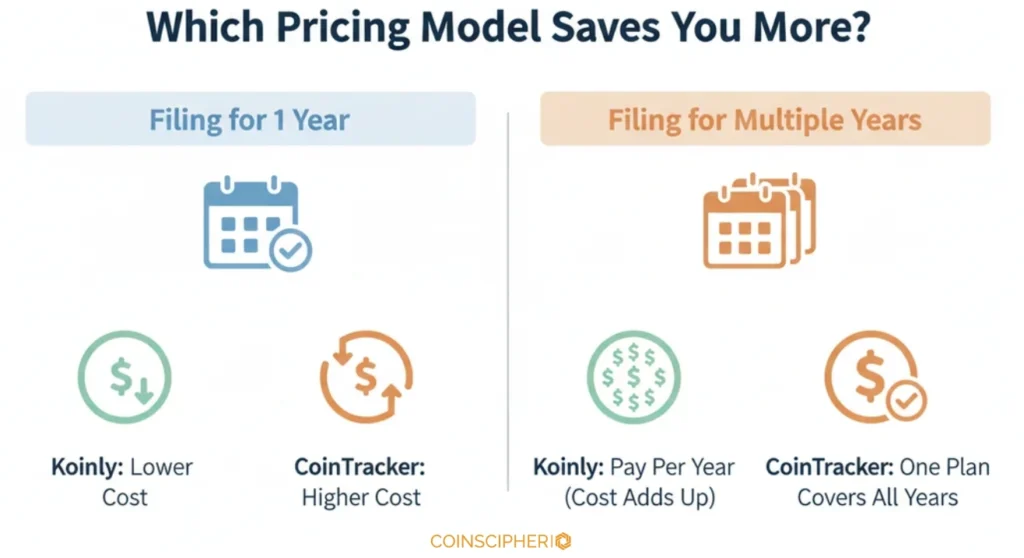
I like Koinly’s per-tax-year model, charging only $99 for 1,000 transactions for a specific year. This makes it highly cost-efficient if you only need to file for the current season. However, if you need to catch up on several years of unfiled taxes, you would need to purchase separate plans for each year, which can add up.
CoinTracker includes all tax years in its pricing model. While the upfront cost for 1,000 transactions is higher at $199, this single payment covers your entire transaction history across multiple years. If you have been trading for several years but are only just now getting around to your paperwork, CoinTracker has better long-term value.
Which Offers The Best Blend of Usability and Features
It depends. I compared both tools below and gave a verdict:
| Feature | Koinly | CoinTracker |
| Easy to use, without compromising functionality | Yes | Yes |
| Automatic error detection | Yes | Yes |
| Broad supported transaction types | Yes | Yes |
| Advanced transaction filters | Yes | Yes |
| Customizable tax settings | Yes | Limited (country-dependent) |
From my Koinly vs CoinTracker comparison, both provide automatic error detection. They flag the “messy” parts of blockchain data, like missing transaction history. Besides, both support many transaction types and have advanced filters. With this feature, you can sort through thousands of entries fast to find specific trades, transfers, or staking rewards without losing functionality.
However, you will encounter a difference in customizations. Koinly offers full support for customization, which is ideal if you need to adjust reports based on specific, non-standard financial scenarios or niche local regulations. CoinTracker’s customization is limited and country-dependent. This suggests that while CoinTracker is a better bet for users in its primary markets, it may lack flexibility in other markets.
TrustPilot Reputation
I consider 4.6/5 a strong rating for Koinly and CoinTracker on Trustpilot. But I took note of user comments and opinions, as this tells their overall experience.

Source: Trustpilot

Source: Trustpilot
Koinly Trustpilot Reputation
Many satisfied reviewers consistently praise the platform for simplifying the reporting process, noting that it reduces the stress of tax season. Others describe customer support as helpful and responsive. Besides, users find seamless integration of numerous wallets and exchanges helpful, as it allows a consolidated view of diverse portfolios.
However, some users raised concerns over:
- Data accuracy, with some users saying that certain transactions or historical purchases may not be categorized correctly.
- Price handling issues, as some tokens show “zero cost basis” or incorrect price entries that require tedious cleanup.
- The pricing model, which tends to be on the higher end compared to competitors.
- A steep learning curve when attempting to reconcile highly complex DeFi activities or large, multi-chain wallets.
CoinTracker Trustpilot Reputation
I found the following recurring user feedback for CoinTracker.io. Customers often highlight strong customer support from helpful support staff. Others appreciate easy integration with exchanges and wallets, which saves time compared to manual tracking. Yet others praise its ability to consolidate portfolios and generate reports with ease.
On the flip side, some users have complained about:
- Occasional sync or transaction discrepancy issues, leading to mismatches or needing help reconciling data from exchanges.
- Slow customer support.
- Jumps in subscription prices (which I highlighted in the pricing comparison).
How Does Crypto Tax Software Actually Calculate Your Gains?
From your data. But here is what you need to understand.
Crypto tax software is there to help you with the calculation of gain and loss to BE TAXED properly. It also helps you understand how much you made or lost in a crypto transaction. To do this, the software needs to know the exact price you paid for a coin when you first bought it. When you eventually sell that coin or trade it for another coin, the software compares that original price to the new price. If the value went up, you have a gain. If not, you have a loss. Your tax bill will be based on these areas.
For the software to get these numbers right, it tracks all transactions you made across every exchange and wallet. It organizes all your transactions in a row by date. When you sell, it looks back at your history to find when you bought it. The software usually follows your set rules, like FIFO or HIFO, to match your transaction to the purchase date. It also factors in any fees you paid to determine your taxable profit. Swapping one coin for another is treated as a sale even if you never touched “real” cash. This is because you disposed of one coin and bought another at the same time.
Many investors get it wrong with data. If the data is inaccurate or incomplete, there are unmatched transfers between different accounts, missing deposits, or wrong pricing, the same will appear on the report and generate wrong tax numbers. This is why you should choose the right software for your crypto tax calculation.
Here is a practical example:
Let’s say you sold your crypto for cash:
1. In January 2024, you buy 1 Bitcoin (BTC) for $30,000 (this is your cost basis).
2. In February 2024, you sell that 1 BTC for $40,000.
The calculation:
$40,000 (your proceeds) – $30,000 (your cost basis) = $10,000 capital gain.
How much tax do you owe?
Because you held it for under one year, it is a short-term capital gain taxed at your ordinary income rate. If you had held it for over a year, it would likely be taxed at a lower long-term rate (0%, 15%, or 20% in the US).
Which One Should I Choose?
It depends.
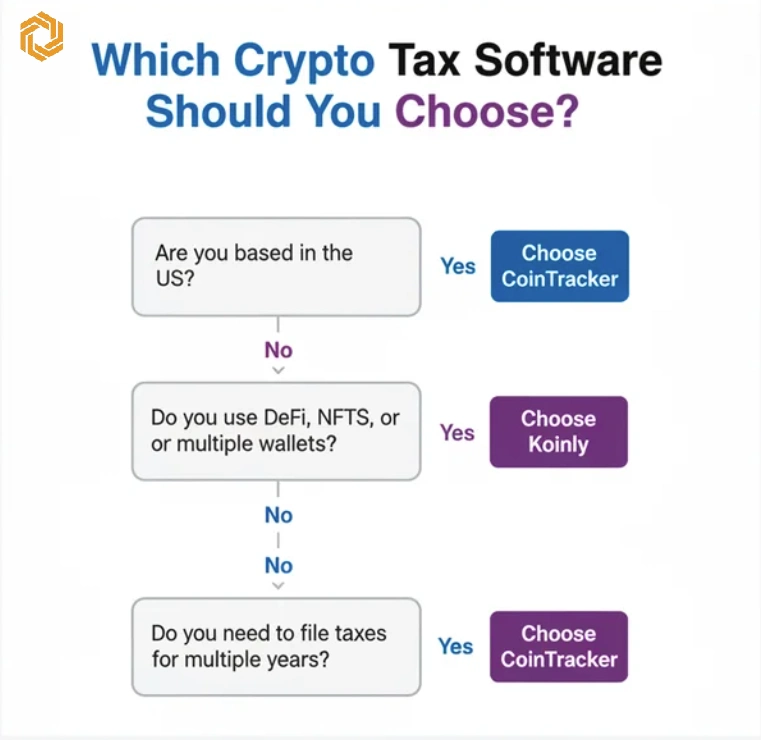
From my Koinly vs CoinTracker review, both tools have the necessary features to track, calculate, check errors, and create crypto reports. However, each has specific strong points. Consider the following scenarios when selecting the ideal one for your case.
If you are a high-volume DeFi/NFT trader, choose Koinly. It won’t charge you a fortune if you have 2,000 trades across five different blockchains. It is also the best choice if you have portfolios across countries outside the US. On the other hand, if you have a simple portfolio on Coinbase and use TurboTax, the extra $100+ is worth the hours of frustration you’ll save on manual data entry. It is also a good choice if you wish to watch your gains year-round, as it has a superior mobile app.
FAQs
How accurate are the tax calculations?
They are highly accurate as long as your data is complete. You need to connect all the sources so that the software determines the cost basis and your profits accordingly.
What is the best crypto tax tracker?
My Koinly vs CoinTracker comparison found no clear winner. Your choice depends on the circumstances. Koinly is better in terms of features-to-price ratio, while CoinTracker offers a better user experience and US-specific integrations.
What is better, Koinly or CoinTracker?
For many investors, Koinly is better because it is more affordable and handles a wider variety of exchanges. However, high-net-worth US users with simple exchange-based portfolios will find CoinTracker’s premium interface and support preferable.

I’m Eric Nkando, a crypto and crypto tax enthusiast, with other extensive experiences in forex and stock markets. I believe crypto and blockchain are no longer alien topics and I’m here to help investors tackle emerging issues of taxation and prudential investment strategies. My approach? Delivering clear, insightful analysis on digital assets, market trends, and trading strategies, bridging complex technical concepts with practical investment perspectives. My work has been widely published on leading financial platforms such as Investing.com, FXLeaders, and The Distributed.




