





The complete 2026 guide to adding Arbitrum Sepolia — the only active Arbitrum testnet — including updated RPC details, both setup methods, and troubleshooting for common errors.
- Arbitrum Testnet Overview: Which One to Use?
- Arbitrum Sepolia Network Details
- Method 1: Add Arbitrum Sepolia via ChainList (Recommended)
- Method 2: Add Arbitrum Sepolia Manually
- Adding Arbitrum Sepolia on MetaMask Mobile
- Getting Testnet ETH for Arbitrum Sepolia
- Troubleshooting Common Issues
- Frequently Asked Questions
Important Update: Arbitrum Goerli was deprecated on November 18, 2023 and fully deactivated on March 18, 2024. Arbitrum Rinkeby (RinkArby) was deprecated in December 2022. Arbitrum Sepolia (Chain ID: 421614) is now the only official Arbitrum testnet. If you find guides referencing Goerli or Rinkeby, their RPC URLs and Chain IDs are no longer valid.
Arbitrum Testnet Overview: Which One to Use?
Arbitrum has had multiple testnets over the years. Understanding which ones still exist matters before you add anything to MetaMask — older guides often reference deprecated networks with invalid Chain IDs and RPC URLs.
| Testnet | Chain ID | Status | Notes |
|---|---|---|---|
| Arbitrum Sepolia | 421614 | ✓ Active | Current official testnet — use this one |
| Arbitrum Goerli | 421613 | Deprecated | Deactivated March 18, 2024 |
| Arbitrum RinkArby | 421611 | Deprecated | Deprecated December 2022 |
Arbitrum Sepolia mirrors the full Nitro stack used on Arbitrum One mainnet. It settles to Ethereum Sepolia and uses test ETH (no real value) for gas. You get sub-second block confirmations, the same gas model as mainnet, and full access to canonical bridges — making it the most production-accurate testnet environment available.
Who is Arbitrum Sepolia for? Primarily developers testing smart contracts and dApps before mainnet deployment. If you’re a regular user wanting to try Arbitrum’s mainnet, you want Arbitrum One — not the testnet.
Arbitrum Sepolia Network Details
These are the verified, current parameters for Arbitrum Sepolia as of 2026. Use these for manual MetaMask setup.
| Parameter | Value |
|---|---|
| Network Name | Arbitrum Sepolia |
| Chain ID | 421614 |
| Currency Symbol | ETH |
| RPC URL (Public) | https://sepolia-rollup.arbitrum.io/rpc |
| Block Explorer | https://sepolia.arbiscan.io |
Heads up about Infura RPC URLs: Older guides reference RPC URLs like arb-goerli.infura.io/v3/. These are invalid — they require a personal API key, they pointed to a deprecated testnet, and the endpoint no longer works. Use the official public RPC above, or generate your own key via Alchemy or Infura for production-grade reliability.
Method 1: Add Arbitrum Sepolia via ChainList (Recommended)
ChainList is an open-source EVM network directory maintained by DefiLlama. It automatically fills in all parameters and lets you add networks in one click — the fastest and safest method.
Step 1 – Unlock MetaMask in your browser
Click the MetaMask fox icon in your browser toolbar and enter your password if prompted. Make sure it’s unlocked before visiting ChainList.

Step 2 – Go to chainlist.org and enable testnets
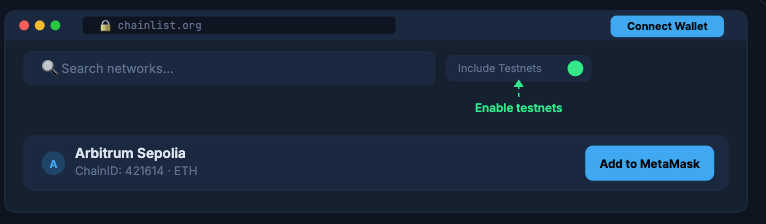
Navigate to chainlist.org. By default, testnets are hidden. Toggle “Include Testnets” to reveal them.
Step 3 – Connect your wallet to ChainList
Click “Connect Wallet” in the top right. MetaMask will prompt you for permission — click Next then Connect.
Step 4 – Search for “Arbitrum Sepolia”
Type Arbitrum Sepolia in the search bar. The card showing Chain ID 421614 will appear. Click “Add to MetaMask”.
Step 5 – Approve the network in MetaMask
A MetaMask popup will appear with the network details. Review them, click “Approve”, then “Switch Network” to activate Arbitrum Sepolia immediately.
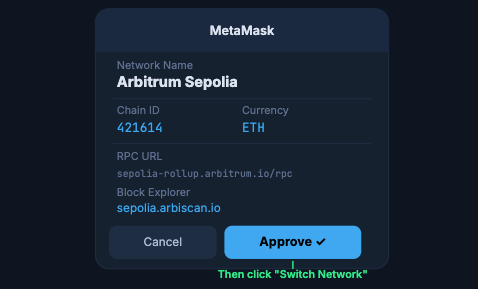
Done! “Arbitrum Sepolia” will now appear in your MetaMask network dropdown. You can switch to it anytime from the network selector.
Method 2: Add Arbitrum Sepolia Manually
Use this if ChainList is inaccessible or you want full control over your RPC provider choice.
Step 1 – Open the MetaMask network selector
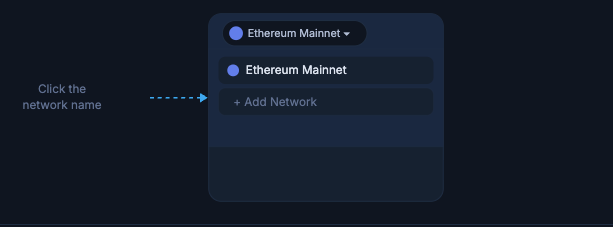
Click the network name at the top of your MetaMask wallet (e.g. “Ethereum Mainnet”). A dropdown will appear showing your saved networks.
Step 2 – Click “Add Network” → “Add a network manually”
At the bottom of the network list, click “Add Network”. On the next screen, choose “Add a network manually” at the bottom.
Step 3 – Fill in the Arbitrum Sepolia parameters
Enter each field exactly as shown in the table above. Double-check the Chain ID — it must be 421614, not 421613 (deprecated Goerli).
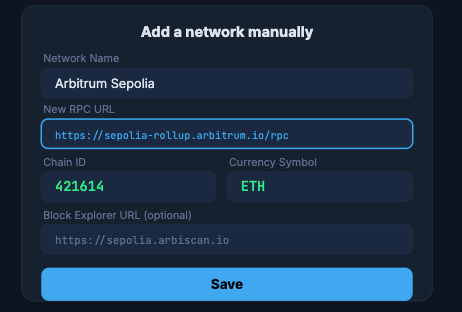
Step 4 – Save and switch
Click “Save”. MetaMask will confirm the addition and offer to switch — click “Switch to Arbitrum Sepolia”. You’re ready.
Adding Arbitrum Sepolia on MetaMask Mobile
MetaMask’s iOS and Android app supports both methods:
Mobile — Settings Via the app’s network settings
Tap the hamburger menu (top-left) → Settings → Networks → Add Network → Add a Network Manually. Enter the Arbitrum Sepolia parameters, then tap Add.
Mobile — Easiest – Via ChainList in the built-in browser
Open the browser tab inside the MetaMask mobile app, navigate to chainlist.org/chain/421614, and tap “Add to MetaMask”. It connects directly to your mobile wallet. Remember to enable “Include Testnets” first.
Getting Testnet ETH for Arbitrum Sepolia
Arbitrum Sepolia uses test ETH — it has no real-world value and cannot be bought. You get it from faucets for free. Since Arbitrum Sepolia settles to Ethereum Sepolia, you may first need Sepolia ETH before bridging to the L2 testnet.
Recommended faucets: Alchemy’s Arbitrum Sepolia faucet (alchemy.com/faucets/arbitrum-sepolia) and Infura’s faucet typically provide test ETH directly on the Arbitrum Sepolia layer. Some faucets require a mainnet ETH balance to prevent abuse.
Troubleshooting Common Issues
⚠️ The RPC URL I found in another guide doesn’t work
Older guides likely reference Arbitrum Goerli (deprecated) or incomplete Infura URLs requiring an API key. Use the verified public RPC: https://sepolia-rollup.arbitrum.io/rpc with Chain ID 421614.
⚠️ “This Chain ID is already added”
Arbitrum Sepolia is already in your MetaMask. Open the network dropdown and switch to it — no need to add it again. If the wrong RPC is saved, go to Settings → Networks → Arbitrum Sepolia → edit the RPC URL.
⚠️ Testnets don’t appear on ChainList
ChainList hides testnets by default. Click the “Include Testnets” toggle near the search bar. Arbitrum Sepolia will then appear in search results.
⚠️ Network added but balance is zero
Test ETH must be obtained from a faucet — it doesn’t appear automatically. Your wallet address is correct, but you need to request testnet funds. See the Faucets section above.
⚠️ “Could not fetch chain ID” error
The RPC server may be temporarily overloaded. Wait a minute and retry, or use an alternative RPC provider. Alchemy and Infura both offer Arbitrum Sepolia RPC endpoints — these require a free API key but provide more reliable uptime than the public endpoint.
⚠️ Can I have both Arbitrum Sepolia and Arbitrum One active simultaneously?
Yes. MetaMask stores all added networks and you can switch between them freely. Both can exist in your network list at the same time — they are separate chains with separate balances.
Frequently Asked Questions
What happened to Arbitrum Goerli?
Arbitrum Goerli was officially deprecated on November 18, 2023 and fully deactivated on March 18, 2024. It no longer processes transactions. Arbitrum Sepolia replaced it as the official testnet.
Is Arbitrum Sepolia the same as Arbitrum One?
No. Arbitrum One is the mainnet where real ETH is used. Arbitrum Sepolia is a testnet — it uses test ETH with no real value, and it’s designed for development and testing only. Both use the same Nitro technology stack.
Can I use the same wallet address on both Arbitrum Sepolia and Arbitrum One?
Yes. Your MetaMask address is identical across all EVM-compatible chains. However, assets are separate — testnet ETH exists only on the testnet and has no real-world value.
Is ChainList safe to use?
ChainList (chainlist.org) is maintained by DefiLlama, a reputable DeFi analytics platform, and is open-source on GitHub. Adding a network through ChainList does not expose your seed phrase or private keys. The only risk to avoid is visiting phishing copies of the site — always verify the URL before connecting your wallet.
Should I use the public RPC or get my own API key?
For occasional testing, the public RPC (https://sepolia-rollup.arbitrum.io/rpc) works fine. For development or production-grade apps with high transaction volume, a dedicated RPC endpoint from Alchemy or Infura provides better reliability and rate limits.
Are there performance differences between Arbitrum Sepolia and Arbitrum One?
Arbitrum Sepolia is slightly less congested than mainnet since test-only traffic is lower, which can result in faster confirmation times. However, both chains use the same Nitro stack, so smart contract behavior and gas mechanics are essentially identical — making Sepolia an accurate staging environment before mainnet deployment.





